
Image Controls
Advanced WordPress Dark Mode Image Control Settings
Get full control over how images appear in dark mode with the Darkify plugin. From brightness and grayscale to background darkness, SVG inversion, and replacement images, explore all the image control settings available for a perfectly styled site.
Light mode: original image
Optimize image brightness for dark mode
Dim images so they sit comfortably against a dark background.

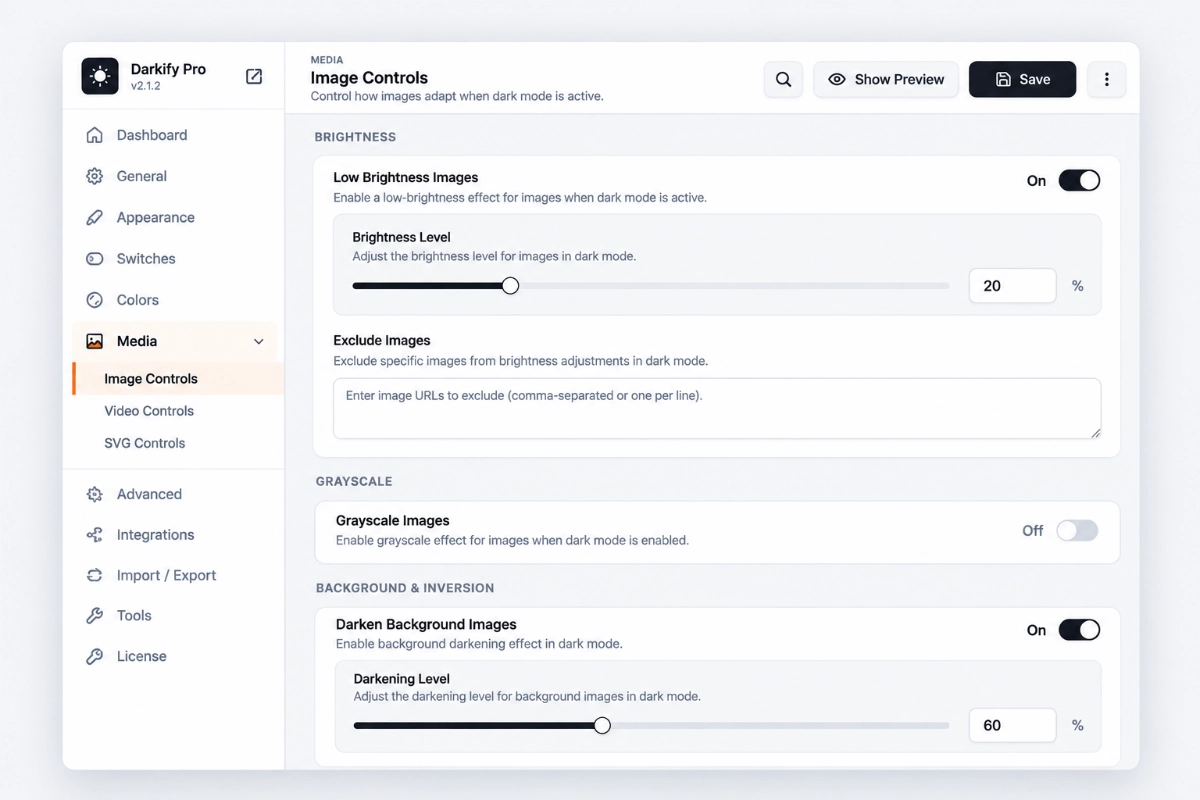
Low Brightness Image
Reduce the brightness of all images in dark mode to create a softer, more comfortable look.
Brightness Adjustment
Fine-tune brightness levels from 0% to 100% for the perfect balance.
Exclude Specific Images
PRO
Use a comma-separated URL or a list of image URLs to exclude certain images from brightness adjustment.
See image brightness in action
Flip the switch. The image on the left takes the low-brightness treatment; the one on the right is excluded.

This image applied Low Brightness on dark mode

This image is excluded from the brightness
Convert images to grayscale for a cohesive dark mode design
A unified, restrained look — with per-image exceptions when you need color.
Grayscale Image
Apply a grayscale filter to all images in dark mode for a sleek, professional look.
Brightness Adjustment
Adjust grayscale intensity from 0% to 100% to match your site’s style.
Exclude Specific Images
PRO
Use a comma-separated URL or a list of image URLs to exclude certain images from grayscale filtering.

See grayscale image conversion in action
The left image converts to grayscale in dark mode; the right one keeps its color.

This image applied Grayscale on dark mode

This image is excluded from the grayscale
Control background image darkness for a more balanced design
Background images often stay too bright in dark mode. Set a darkening level and keep overlaid text readable.

Automatically invert inline SVGs for consistent dark mode
Dark logos and icons disappear on dark backgrounds. Darkify flips them for you.
Invert Inline SVG
Automatically invert inline SVGs for a clean, polished look in dark mode.
Invert Specific Images
PRO
Target specific images for inversion using their URLs.
See SVG inversion in action

Inline SVG, inverted in dark mode
Pro
Replace images for a customized dark mode experience
Swap any image for a purpose-made dark version — no filters, no compromises.

Replace Images
Swap out images for dark mode versions for a more cohesive design.
Custom Uploads
Use the Upload field to add both normal and dark mode versions of each image.

See Replace Image in action
Common Questions About Image Controls
Still unsure? Talk to us.